Every designer knows the moment: a meeting ends, the whiteboard is filled with ideas, and the real work begins. Turning those ideas into wireframes, aligning them with design systems, and iterating through feedback cycles can take days. But what if that process could change? At Designsuite.ai, we’ve been exploring and actively using Claude AI integrated with Figma through the Model Context Protocol (Figma MCP) to see how AI can support design workflows.
Rather than replacing designers, the goal is to understand how AI can handle execution-heavy tasks while designers focus on strategy, creativity, and user experience. Before diving into what this looks like in practice, it’s important to understand the technology enabling it.
What Is the Figma MCP Connection?
The Model Context Protocol (MCP) is an open standard that allows AI models to communicate directly with external tools and services. Figma has built its own MCP server, essentially a bridge that lets an AI model reach inside your design files and interact with them natively.
This isn’t a plugin. It’s not a copy-paste workflow between browser tabs. Through MCP, an AI connects to your Figma workspace, reads your component library, understands your design tokens, and generates or manipulates real Figma layers in response to plain-language instructions.
Think of it as giving your AI collaborator a direct line into your design environment, no translation layer, no manual handoff, no reformatting.
What an AI can access through Figma MCP:
- Your full component library and variants
- Design tokens (colors, spacing, typography)
- Existing frames and layer structures
- File-level variables and shared styles
- Live browser UI (via code-to-canvas capture flows)
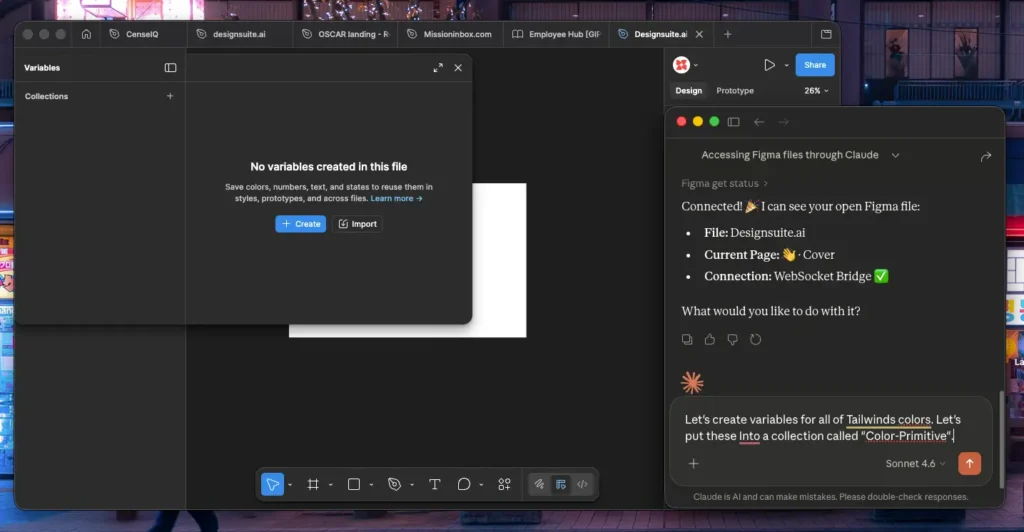
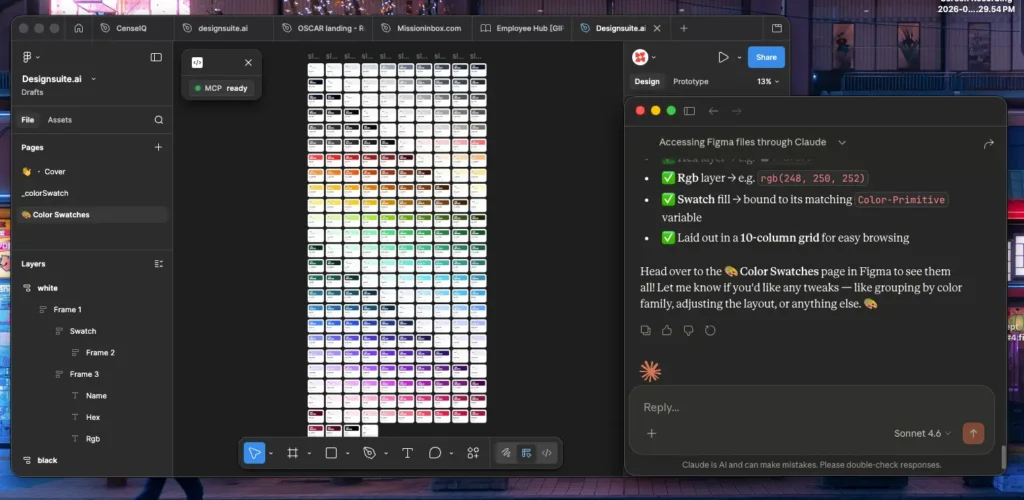
The result is an AI that doesn’t just suggest what a design should look like; it builds it, with your actual assets, in your actual file.
Examples:
Why Claude Is the Best AI for the Figma MCP Connection
Not all AI models are equal when it comes to design workflows. Claude stands apart for several reasons that are especially relevant in a Figma context.
1. Superior Instruction-Following
Design prompts are nuanced. “Use my card component, not the legacy one” or “Apply the mobile spacing token, not the desktop variant”, these distinctions matter. Claude is trained to follow multi-part instructions with precision, reducing the back-and-forth that other models require to get outputs right.
2. Deep Contextual Understanding
Claude can hold a full design system in context, components, tokens, naming conventions, and structural patterns, and apply them consistently across a session. It doesn’t lose track of your system constraints mid-workflow.
3. Long-Context Reliability
Complex design files are large. Claude’s extended context window means it can process an entire Figma file structure, your full component library, and a multi-step brief without losing coherence. This is critical for projects with real-world complexity.
4. Safe, Predictable Outputs
In professional design work, unpredictability is costly. Claude is built with a strong emphasis on reliability and safety; it doesn’t hallucinate component names, invent token values that don’t exist, or generate layers that break your file structure.
5. Natural, Collaborative Dialogue
Claude is designed for back-and-forth conversation. Designing is inherently iterative: “Actually, make that three columns instead of two,” or “Add an error state to the input field.” Claude handles these refinements naturally, making the design process feel like working with a skilled collaborator rather than operating a tool.
That’s why at Designsuite.ai, Claude is the AI we’ve built our workflow around. After testing multiple models against real client projects, Claude consistently delivered the most accurate, on-brand, and iteration-ready outputs through the Figma MCP connection.
What This Looks Like in Practice
Generating Wireframes in Seconds, Not Hours
With Claude connected via MCP, wireframing becomes a conversation. You describe what you need, Claude pulls the relevant components from your library, applies your spacing tokens, and inserts a fully layered wireframe directly into your Figma file.
Example prompt:
“Create a mobile onboarding flow, three screens: welcome, account setup, and preference selection. Use my design system’s input fields, CTA buttons, and card components. Low-fidelity, no imagery.”
What comes back isn’t a static mockup you have to rebuild. It’s structured, editable layers using your exact components, ready for immediate feedback, annotation, and iteration. The prompt-to-wireframe cycle that once took two to four hours now lands in under fifteen minutes.
Turning Wireframes into Clickable Prototypes
Select your existing wireframe frames in Figma, connect through MCP, and instruct Claude to layer in the interaction design.
Example prompt:
“Convert this three-screen onboarding wireframe into a clickable prototype. Add hover states to all buttons, a slide transition between screens, and error states on the input fields. Preserve existing variables.”
Claude analyzes each layer’s structure, adds Figma’s native interaction properties, and returns a prototype your team can test immediately. No coding required. No manual linking of frames.
Setting Up the Integration: A Step-by-Step Guide
Good news: This doesn’t require a developer or more than about fifteen minutes.
What you’ll need:
- A Figma account (any plan)
- Claude Desktop or Claude Code installed
- Terminal access on your computer
Step-by-step setup:
1. Install Claude. Install Claude Desktop from claude.ai, or Claude Code via npm.
2. Add the MCP server. Run: claude mcp add –scope user –transport http figma https://mcp.figma.com/mcp
3. Authenticate. Open Claude, type /mcp, select “figma,” and complete OAuth. Click “Allow Access.”
4. Verify the connection. Type /mcp again — Claude should confirm: “Connected to figma.”
5. Start designing. Share your Figma file link with Claude and begin prompting.
Looking for an AI-First Design Studio?
If you’re a client looking for faster turnaround times without sacrificing quality, you’re in the right place. Designsuite.ai is an AI-first design studio built specifically for this new era of design, where the best outcomes come from pairing strategic human creativity with the execution power of AI.
What that means for you as a client: faster delivery, more iterations within the same budget, cleaner design-to-development handoffs, and a team that’s always working at the cutting edge of what’s possible.
We’ve built our entire workflow around the Claude–Figma MCP connection because it produces the best results, consistently on-brand, system-compliant, and ready for real-world use from the first iteration.
The shift to AI-first design is happening now. If you want a studio that’s already leading it, let’s talk. Explore what we’re building at Designsuite.ai.